
50 years of knowing exactly what a window needs.
Curtain track selection, bends, recesses, loads and motorisation, explained by the team that has specified, bent and made to measure for retailers, designers, architects and contract projects across Ireland and Northern Ireland since 1976.
“Give us the drawing. We’ll work out what you need.”
What do you need to work out?
Start with the problem, not the product code. Each topic below is also on show at the CWF Experience Centre in Multyfarnham.
Track Selector
Filter by operation, fixing, curtain weight and bend.
02Curtain Weight
Maximum loads for every system.
03Bend Radius Guide
Large, small and no-bend tracks.
04Straight Before a Bend
Minimum lengths for smooth bends.
05Wall Allowance
Track-to-wall distances for bends.
06Recessed Track Planning
Pocket sizes for hidden tracks.
07Motorisation
Somfy motors, batteries and controls.
08CAD / DWG & PDFs
Technical sheets and drawings.
09Headings & Wave Gliders
Curtain headings, the wave glider calculator and double-track spacing.
10Setting Limits
Motorised Roman blinds, curtain motors and channel 5 remotes.
11Stack-Back
Space taken by the motor and master carrier on a motorised 1020.
12Architect Specifications
Specification support for tenders and contract projects.
Ask our teamNarrow the range to what will work.
Choose how the curtain will be operated, how the track is fixed, how heavy the curtain is and whether you need a bend. You’ll see only the systems that fit.
No single system matches all of those. Our team can usually solve it with a bespoke option. Discuss the project.
Choose the track for the curtain, not the other way round.
Heavy blackout, interlined and floor-to-ceiling curtains need a system rated for the load. Motorised systems carry the most weight, up to 60kg depending on the motor.
| Curtain weight | Systems to consider |
|---|---|
| Up to 10kg | 0521, 9111, Project (7kg), Double T (9kg), 1012 (7.5kg), 3/4/5 Panel tracks (6kg) |
| Up to 15kg | 1005, 1019, 1100, 1170 LED, T20, 2300, 1300 corded, 8061, 8062, 9920 & 9930 (10.5kg), 9001 Suspended, 1500 recessed (14kg) |
| Up to 25kg | 2005 (20kg), 9001 (20kg), 5408 (20kg), 6220 (18kg), 1021 (25kg), 5001 Designer (25kg), Techno 30 corded (25kg) |
| Up to 40kg | Techno 30 hand drawn (30kg), Deco 1020 (35kg), 1400 Meeting corded (40kg) |
| Up to 60kg | Glydea (60kg hand drawn), motorised Techno 30, Glydea, 1020, Deco 1020 and Irismo (35–60kg by motor), 541 recessed electric (60kg) |
Weights are the maximum each system is rated to carry. Motorised maximums depend on the motor: battery motors 35kg or 45kg, electric motors 35kg or 60kg.
Bespoke bending for bays, corners and recesses.
CWF tracks fall into three groups: large bend, small bend and straight only. The bend length is the distance the curve takes up on a 90° corner.
Large bend
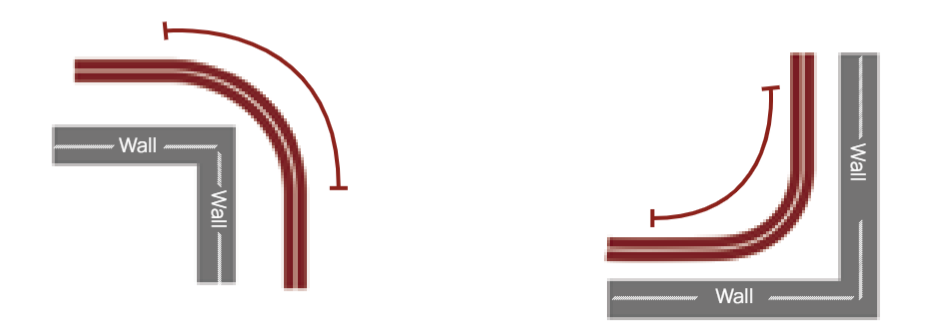
Length of bend for a 90° corner. A soft, sweeping curve for bay windows and heavy curtains.
9001, Glydea, Techno 30, 6220, 1020, 1021, 1300, 1400
Small bend
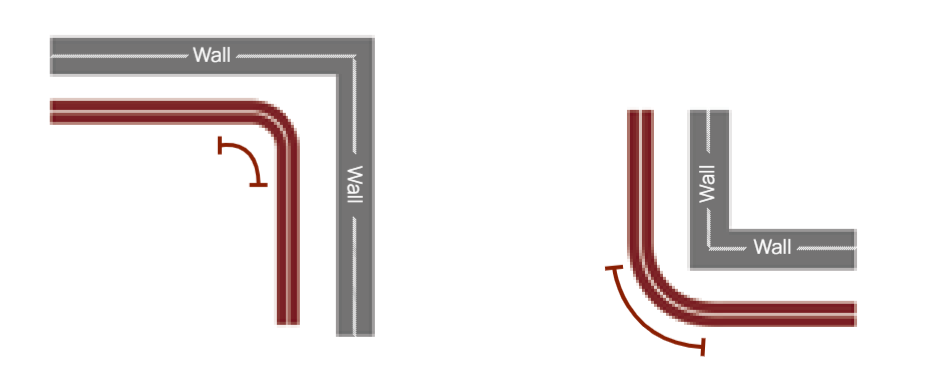
Length of bend for a 90° corner. A tight corner that follows the wall or recess closely.
1005, 2300, 5001, 1100, 1170 LED, 2005, T20, 1500 Concealed Recessed
Straight only
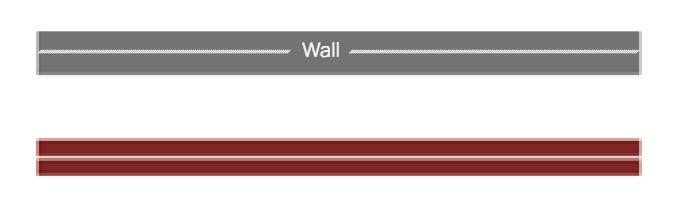
These tracks cannot be bent. Use them on straight runs, or join straight lengths at the corner.
0521, 1019, 5408, 8061, 8062, 9111, 9920, 9930, 1012, T12 Cafe Rod, Deco 1020 (all versions), Top Box 4140, 3/4/5 Panel tracks, Project
French bend: available on any small-bend track (1005, 2300, 5001, 1100, 1170 LED, 2005, T20, 1500). A curve at one or both ends of the track that returns the curtain to the wall and stops light seeping in at the edges. Maximum size for a French bend is 25cm.
541 Recessed Electric: can be bent on request, so ask our team.
Two bends side by side: with large bends, allow a wall size of 59cm plus bracket or allowance between them. This isn’t an issue with small bends.
Every bend needs a straight run first.
Each track needs a minimum straight length before it can bend. That keeps the curtain gliding smoothly, the track fitting perfectly and the system properly supported.
- Confirm whether sizes are wall measurements or track measurements when ordering.
- Wall sizes add the bracket or allowance on the side that returns to the wall.
| Track / bend | A (return) | B (second leg) |
|---|---|---|
| 9001 Corded | Rail 56cm · Wall 56cm + bracket/allowance | – |
| Large bend | Rail 79cm · Wall 79cm | Wall 38cm · Rail 38cm + bracket/allowance |
| Small bend | Rail 29cm · Wall 29cm | Wall 15cm · Rail 15cm + bracket/allowance |
The space between the track and the wall.
Wall allowance is the extra distance a track needs between itself and the wall so it can bend smoothly around corners and architectural features. Getting it right means a seamless fit, smooth operation and a better-looking finish.
- Ceiling fix: A is the distance the track must sit off the wall.
- Wall fix: A is the length of the bracket, so the bracket you choose sets the allowance.
- Double tracks, ceiling fix: A is wall to first track; B is first track to second track. Each allowance stays the same on all sides.
- Tell us whether your sizes are wall or track measurements and we’ll build the allowance in.
Hidden track, clean ceiling line.
A recessed curtain track sits in a pocket in the ceiling so only the curtains are visible. Plan the pocket dimensions and allowances before the ceiling is finished.
Track position
From the face of the recess to the track, on both large and small bends.
Large bend recess
Minimum recess width at the bend for a large-bend recessed track.
Small bend recess
Minimum recess width at the bend for a small-bend recessed track.
Recessed systems include 1500 Concealed Recessed (14kg, hand drawn, small bend), 541 Recessed Electric (60kg, bent on request) and Top Box 4140 Recessed Electric (straight only). Send us the ceiling drawings early and we’ll confirm the pocket.
Somfy motors for curtains and Roman blinds.
Every curtain track motor can be used on all CWF motorised tracks. Choose battery for wire-free retrofits, or electric for new builds and the heaviest curtains.
| Curtain track motor | Type | Max weight | Notes |
|---|---|---|---|
| MOTBS-I45WF | Battery, RTS | 45kg | Plug-in removable battery, 3.6m charging cable, 52mm deep |
| MOTBS-M35WF | Battery, RTS | 35kg | Plug-in removable battery, 3.6m charging cable, 52mm deep |
| MOTES-M35RTS | Electric, RTS | 35kg | 1.5m cable, 50mm deep, also in WT and DCT versions |
| MOTES-G60RTS | Electric, RTS | 60kg | 1.5m cable, 50mm deep, also in WT and DCT versions |
Roman blind kits
Sonesse 28, 30 and 40 Li-Ion battery motors, Sonesse 40 electric (3Nm and 6Nm), and a tilt-and-lift battery motor for the multi-purpose kit. Extension cables, magnetic cables and a 12V plug-in supply are available.
Motorised Roman blind kits →Controls
Situo 1 and Situo 5 RTS Pure II remotes, Telis 16 RTS (16 channels), 1- and 5-channel wall switches, and the TaHoma Switch and Connectivity Kit for smart-home control.
Remotes, switches & controls →Built to measure
Motorised tracks are made to measure in the CWF workshop, and the motor is matched to the curtain weight and the room.
Motorised curtain tracks →The drawings behind every system.
Technical sheets for corded, motorised and panel systems, along with the interactive technical book covering every track and Roman blind kit: dimensions, loads, bracket sizes and glider references. Product pages also carry PDF, TECH and DWG files.
- Track profiles with dimensions and maximum loads
- Wall-fix, ceiling-fix and extendible bracket details with X, Y and Z measurements
- Standard and wave glider references with drop (Y) dimensions
- Bend list, wall allowance, recess and minimum straight-length guides
- Somfy motor, remote and switch specifications
Choose the heading, then size the wave.
The heading decides how the curtain hangs and which gliders it needs. For wave curtains, the glider count comes from the track length and the wave size you choose.
Pencil pleat
Usually for light voiles and fabrics. Made with pencil pleat tape.
Wave
A more contemporary look. Available in 6cm or 8cm wave tape.
Pleated
Used to make single, double or triple pinch pleat curtains.
Eyelet
The fabric is punched out using a press, then an eyelet is inserted.
How many gliders per curtain?
Enter the track length and pick the wave size. Figures come from the CWF Wave Glider Guide for 60mm and 80mm wave gliders.
Leave room for both waves.
A wave curtain sits in front of and behind its track. On a double track, space the tracks so the two waves never touch. The figures below are an example to give you an idea of the space needed. The right spacing depends on your fabric and wave size.
- For example, tracks about 15cm apart.
- That leaves roughly 1cm clear between the back curtain’s wave and the front curtain’s wave.
- Not sure about your fabric or wave size? Send us the drawing and we’ll check it.
Set up a motorised blind or curtain.
Step-by-step setup for Somfy motorised Roman blinds and curtain tracks, using the remote. This is the same training we give hands-on at the Experience Centre.
Connect the motor
Plug the battery into the motor. The motor makes 1, 2 or 3 up/down movements. That tells you its current status.
How many up and down movements did the motor make?
Already paired
No setup needed. Your blind is ready to use.
Pair the remote
- Press ▲ and ▼ to check the blind moves.
- Briefly press PROG on the remote.
- Move the blind to roughly halfway.
- Hold ▲ + ▼ together until the blind jogs.
- Hold MY + ▼ together until the blind jogs.
Setup complete.
Complete initial setup
- Check direction. Press ▲. If the blind goes up, carry on. If it goes down, hold MY until the blind jogs to reverse it.
- Set the upper limit. Hold ▲ to the top position you want, fine-adjust, then briefly press MY + ▼ to save.
- Set the lower limit. Hold ▼ to the bottom position you want, fine-adjust, then briefly press ▲ + MY to save.
- Finish. Press MY for 2 seconds until the blind jogs, then briefly press PROG.
Setup complete.
Use small adjustments and take your time when setting limits.
Only use these steps when the blind’s limits are already set.
Adjust the top position
- Press ▲ to bring the blind to its current upper limit.
- Press ▲ + ▼ together until the blind jogs once.
- Move the blind to the new upper position.
- Press MY until the blind jogs once to confirm.
New upper limit set.
Adjust the bottom position
- Press ▼ to bring the blind to its current lower limit.
- Press ▲ + ▼ together until the blind jogs once.
- Move the blind to the new lower position.
- Press MY until the blind jogs once to confirm.
New lower limit set.
Switch the power on.
Press ▲ and ▼ until the curtain makes a back-and-forth movement.
Press ▲ or ▼. The motor runs a full open/close cycle.
Press ▲ to check the direction.
Briefly press PROG on the control point. The motor makes a back-and-forth movement.
End limits set themselves
The motor sets its end limits automatically when the curtain reaches the two ends of the track. If you need a shorter curtain run, the end limits can be re-adjusted. Ask us and we’ll talk you through it.
Control every blind from one channel
On a multi-channel remote, channel 5 is when all four lights at the bottom are lit. Copy each blind onto channel 5 so one button moves them all, while each blind keeps its own channel too.
Copy a blind to channel 5
- Go to the channel you want to copy, for example channel 1.
- Turn the remote over. Press and hold PROG until the blind jogs once.
- Move to channel 5 and press PROG again. The blind jogs once.
- The blind now works on channel 1 and channel 5. Repeat for the other channels.
Stack-back on a motorised 1020.
On a motorised 1020, the motor head and the master carrier take up part of the track. Allow for this space on top of the curtain itself when working out how much of the window stays covered.
| 1020 motorised | Standard | Wave |
|---|---|---|
| Master carrier end | 125mm 5″ | 130mm 5⅛″ |
| Motor head end | 112mm 4⅜″ | 112mm 4⅜″ |
| Single curtain | 237mm 9⅜″ | 242mm 9½″ |
| Pair of curtains | 474mm 18 11/16″ | 484mm 19″ |
These figures are for the track hardware only. The stacked curtain fabric adds to this, depending on the fabric, fullness and heading.
coming soon
See it working before you specify it.
At our premises in Multyfarnham, the CWF Experience Centre puts blinds and curtain tracks on display, working, alongside smart integration that shows bent tracks, LED integration and motorisation in action. It also shows how curtains and tracks can do more than dress a window: they can divide, shape and create spaces.
- On display: blinds and curtain track systems, bent tracks, LED-integrated tracks and motorised systems with smart-home control.
- Creating spaces: curtains and tracks used as room dividers, backdrops and flexible zones, not just window furnishings.
- Hands-on training: how brackets are fixed, how curtains are hung, and how limits are set on motorised blinds and rails.
Give us the drawing. We’ll work out what you need.
From one bay window to a full hotel fit-out, the CWF team will help you choose the system, plan the bends and recesses, match the motor and make it to measure.